uCloud v1.2
Securely Manage, Preview & Share Your Files
- created: 01/07/2016
- latest update: 03/18/2016
- by: Adam Wilson - MFScripts
- email: support@mfscripts.com
Thank you for purchasing uCloud (formally Cloudable). If you have any questions that are beyond the scope of this help file, please feel free to log a support request via our support portal. Thanks so much!
Welcome
uCloud is a fully featured, quick and secure file manager.
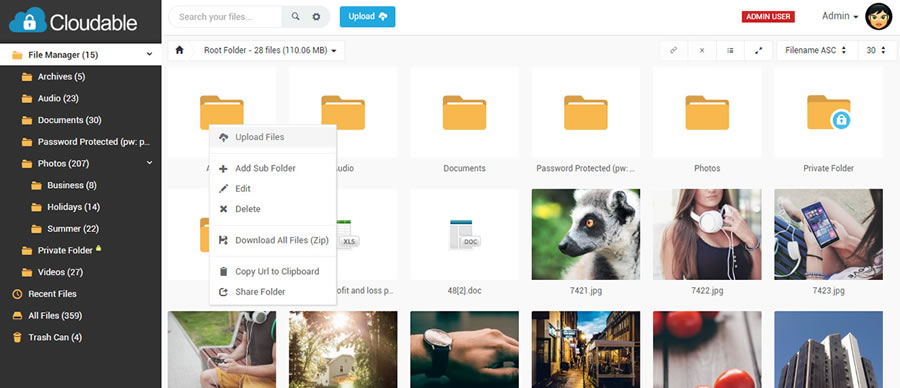
It's been built for users and businesses who which to quickly organise, manage and share their files via a web browser.
You can upload large files (>5GB) with built in file chunking, manage files into folders, set folder/file passwords and/or access permissions, preview a huge amount of files directly within the browser, resize images, setup multiple users, expand using multiple file server storage and manage everything via the feature rich admin area.
uCloud has been designed to be easy to install, the config file and database is automatically created during the installation wizard. You simply need a web hosting account and one free MySQL database (no programming knowledge is required).
If you have any issues with installation or even after you've started using the script, please leave a comment via CodeCanyon and we will get back to you as soon as possible.
uCloud has been built using our own internal framework that is extremely robust and efficient. We've been using it on all our scripts at MFScripts for over 5 years! It's well tested by over 4,200 users.
Whenever we release a new version of uCloud you'll be notified via the script admin area of the new release. If you're still within your support period you can download it free of charge via CodeCanyon.
Please note: If you modify the code and upgrade may overwrite your own code changes. You should make note of any changes you make so you can easily re-apply them if needed.
Features
These are the primary features of uCloud:
-
Upload Files:
- Multi-file uploader with progress.
- Images previewed before upload. File icons shown for each file before upload.
- Percentage progress, size remaining, upload speed and time remaining.
- Background uploading of files. Continue to manage your account while files are being uploaded.
- Drag & Drop into the browser to begin uploading. (Firefox & Chrome)
- Send via email option once uploaded.
- Copy folder url to the clipboard link.
- Built in url shortener.
- Support for multiple file servers.
-
File details page with the following:
- Full path to the file.
- HTML code to directly copy into a website.
- Forum code to directly copy into a forum.
- Link to view statistics for the file.
- Link to remove the file.
- Links to share with common social media sites; Facebook, Twitter etc.
- Link to share via email.
-
File Manager:
- Built using ajax so the entire file manager is lightning fast!
- Thumbnails generated for images & pdf files (requires imagemagick)
-
File previews for a huge amount of files:
- Images - jpg, jpeg, png, gif (static), wbmp
- Documents - doc, docx, xls, xlsx, ppt, pptx, pdf, pages, ai, psd, tiff, dxf, svg, eps, ps, ttf, otf, xps
- Videos - mp4, flv, ogg
- Audio - mp3
- Caching of image thumbnails for fast load times.
- Right-click menu options on each file & folder to quickly manage the options.
- Powerful search widget. Quickly shows you files and folders which match your search.
- Advanced search to find files by upload date and folder.
- Requires account to upload and manage files. (admin controlled)
-
2 view options for files:
- Icon view - showing file thumbnails.
- List view.
- Full screen mode.
- Sort file listing by filename, file size, date uploaded, last access and total downloads.
- Change the amount of files shown per page.
- Download an entire folder as a zip file.
- Duplicate file(s) option.
- Rename, move & delete file options.
-
File Downloads:
- Built in support for xSendFile & xAccelRedirect! Big improvements on server performance if enabled.
- Files are stored securely on your web host. They are renamed without the extension on upload and placed inside a folder which can't be accessed directly.
- Downloads are done using a secure access hash which expire after use. The same download link can not be used multiple times.
-
Detailed File Statistics:
- Daily, weekly, monthly downloads.
- Referring sites.
- Visiting countries.
- Visiting browsers.
- Visiting operating systems.
-
Sharing:
- Links to share files & folders via Facebook, Twitter, LinkedIn & more.
- If a folder is set as private, generate a unique url to enable someone without an account to access it.
- Send via email option on all folders.
-
Security:
- Account password stored using SHA256 & PBKDF2 key extender.
- Set file folders and private or public.
- Set passwords on file folders.
- IP blacklisting - block IP addresses from using the site.
- Support for https.
- Externally tested for XSS and SQL injection attacks.
-
Customisations:
- Written for PHP5.3+.
- 100% full source code.
- Easy installation.
- Fully customisable.
- Modern template. (easily customise and create additional ones)
- Simple, clean, ajax style look and feel.
-
Admin Area:
- Separate dedicated admin area.
- Dashboard detailing downloads and active files.
- Search files.
- Disable files.
- Manage users and filter by user files.
- Manage blocked IPs.
- Manage site settings.
- Set and manage file servers.
- Configure to use specific file server or the one with most space.
- Set template.
- Amend account expiry date.
-
Set user account settings:
- Days to keep inactive files.
- Maximum upload filesize.
- and more.
- Option to set the filename on the download url.
- Modern Ajax interface.
Support
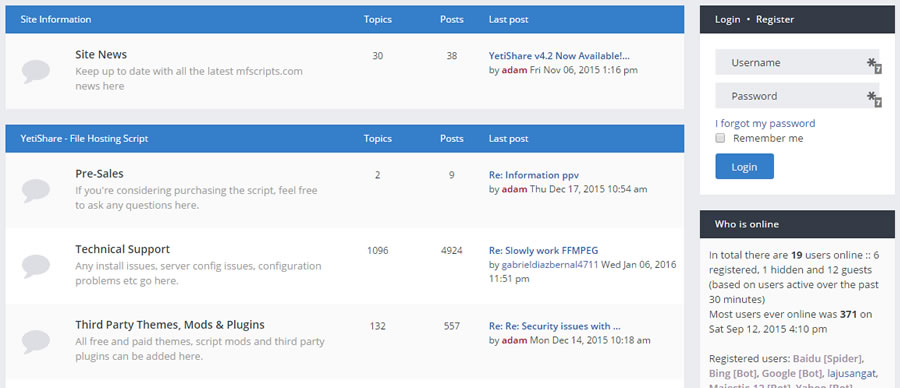
We have our own support portal that includes a support ticket system, knowledge base and forums, please register via our forum for full access.
- Support Forum - https://forum.mfscripts.com
- Knowledge Base - https://support.mfscripts.com/public/kb/
- Ticketing System - https://support.mfscripts.com
Note: You will need to be have a valid license & within your support period to access the ticketing system. You have lifetime access to the support forum and knowledge base included within your purchase.
System Requirements
uCloud is written in PHP5.3 and uses a MySQL5 database. uCloud is a "Web Application" that must be installed on a Web Server.
You must install uCloud on a web host that supports PHP5.3, MySQL5 and Apache or Nginx.
You may also install uCloud on your personal computer by using one of the many options (i.e google WAMPserver or XAMPP), this is not covered in this document.
The full system requirements can be found below.
- PHP 5.3+
- MySQL 5+ with 1 empty database
- PHP PDO MySQL Extension
- PHP GD Extension (normally enabled as standard)
- PHP MCrypt Extension
- Apache with Rewrite Module or Nginx
- A Web Browser that supports HTML5/Javascript (IE9+, FireFox, Safari, Chrome)
Installation
Installation Wizard
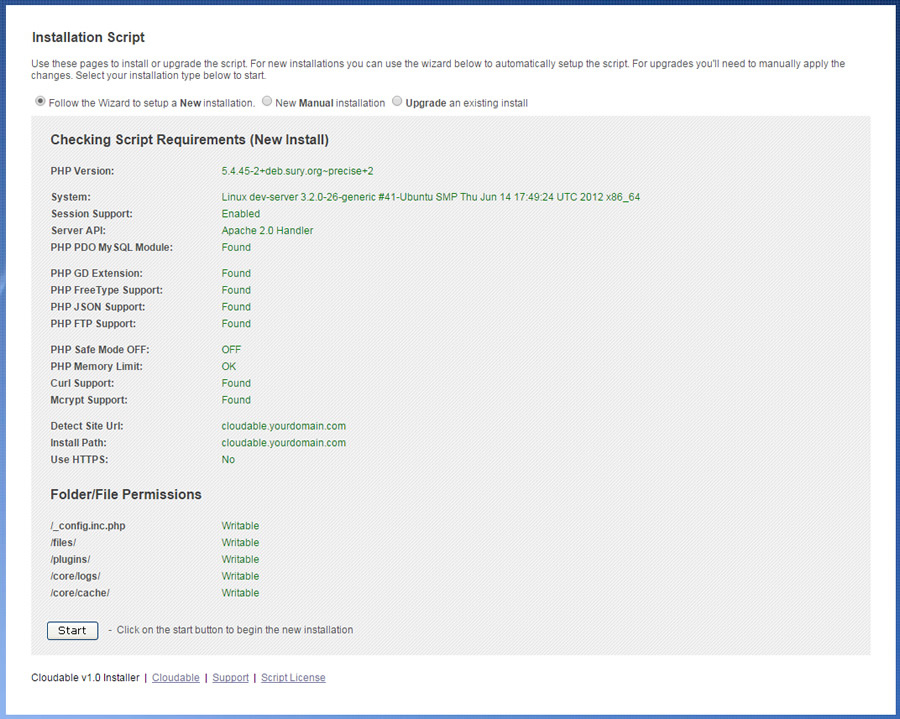
We've built an installation wizard into the script to make it really easily to get started.
- Download the zip file from CodeCanyon.
- Extract the contents into a folder on your computer.
- Using a FTP client (such as FileZilla), upload the extracted contents to your web host. Note: You can install uCloud as the main site, in a sub-folder on your existing web hosting or setup a new subdomain.
- While it's uploading you can create the database. Login via your web host control panel (such as cPanel) and create an empty database.
- Setup a new MySQL user and ensure you assign it to your new database with all privileges. Note your new MySQL username, database and password for later.
- Once the FTP upload has completed, via your web browser go to:

- Follow the steps shown in the install wizard. Enter your MySQL details when prompted and the database will be automatically installed.
- Setup the cron tasks, links provided within the installer, or here - https://support.mfscripts.com/public/kb_view/26/ every 5 minutes (more info below in the CRON section).
- Done - Enjoy!
If you have any issues with the installation, please see the troubleshooting section of this document.
File & Folder Permissions
During the uCloud install 1 file and 4 folders will need write permissions. Ensure the following have CHMOD 755 (or 777 depending on what your web host allows)
- /_config.inc.php
- /files/
- /plugins/
- /core/logs/
- /core/cache/
Cron Tasks
The cron tasks enable uCloud to send emails, tidy data (and other tasks) in the background. Please ensure these are setup as they are required by the script.
There are a number of ways to set these up. The best method is to use a Linux Cron style setup on the server itself. This will be the most reliable method. Although you can use one of the many free web cron services, these often only work once every 10-15 minutes, meaning that crons will take longer between runs.
Linux Crons
- Type crontab -e in your linux command line.
- Type in the following:
0 0 * * * php /path/to/your/install/admin/tasks/auto_prune.cron.php >> /dev/null 2>&1
0 0 * * * php /path/to/your/install/admin/tasks/create_internal_notifications.cron.php >> /dev/null 2>&1
0 * * * * php /path/to/your/install/admin/tasks/delete_redundant_files.cron.php >> /dev/null 2>&1
0 0 * * * php /path/to/your/install/admin/tasks/downgrade_accounts.cron.php >> /dev/null 2>&1
*/5 * * * * php /path/to/your/install/admin/tasks/process_file_queue.cron.php >> /dev/null 2>&1
0 1 * * * php /path/to/your/install/admin/tasks/create_email_notifications.cron.php >> /dev/null 2>&1
- Save
- crontab -l should now list the cron process
If you do not have access to the command line you might have access to the web hosting control panel that should allow this. Otherwise talk with your webhost.
Upgrading
Upgrading is fairly straight forward. Use the following guide to upgrade your existing install to a new release.
- Download the latest version of the uCloud zip file
- Backup your MySQL database, any /files/ and the _config.inc.php file.
- Backup any custom code or changes you have made (these may be overwritten).
- Unzip the newly downloaded zip file onto your local computer.
- Remove the local _config.inc.php file & the install/ folder.
- Upload the new files to your existing installation of uCloud replacing all existing files.
- Within your hosting control panel, load phpMyAdmin and select your new database. In the right-hand section click on 'import'. Attach the the relevant sql patches from the directory `/install/resources/upgrade_sql_statements/` and submit the form. Choose the patches between your current script version number and the latest, ensuring you do them in version number order. If there are none, you can ignore this step.
- Done - Enjoy the upgrade!
Website Settings
The website settings can be found via the admin area. To access:
- Login via the /admin url using your site admin credentials.
- On the top menu hover over 'Configuration', then click on 'Site Settings'.
- You'll see a screen similar to the following:
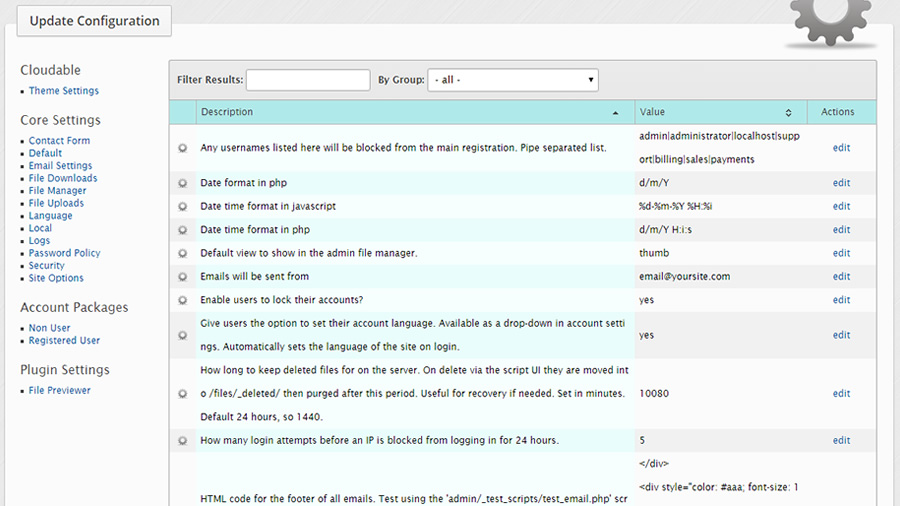
- All the settings are categoried on the left-hand side. By clicking on any of these it will filter the view on the main part of the page.
- To edit, click 'edit' on any of the values.
- Any changes are immediately reflected on the site.
Add A New Language
uCloud supports any number of languages. All the text content is routed through the translations module and can be translated.
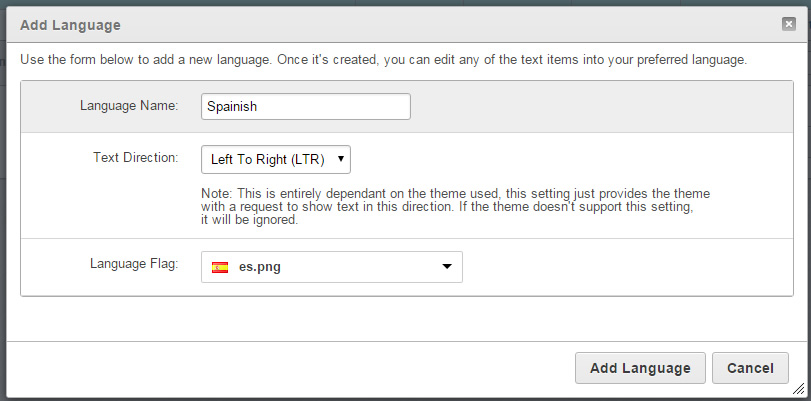
Add New Language
- Login to the admin area.
- Via the Configuration menu, click Translations.
- Click the 'Add Language' button.
- Set the language name, Text Direction (only LTR) supported for now and the flag.
- Once added click on 'manage translations' and you'll see each text entry that you can edit.
- You can also export & import translations on the same screen if you'd prefer to edit them offline.
- To set as the main site language click the 'Default' checkbox on the 'Manage Languages' screen.
Note: You may need to logout and back in to see the new language take affect.
Translate Text Content
- Load the 'languages' page within the admin area.
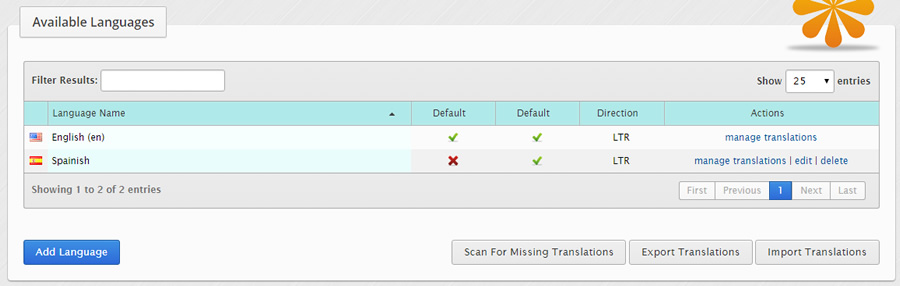
- Click 'manage translations' and search for the text you'd like to translation.
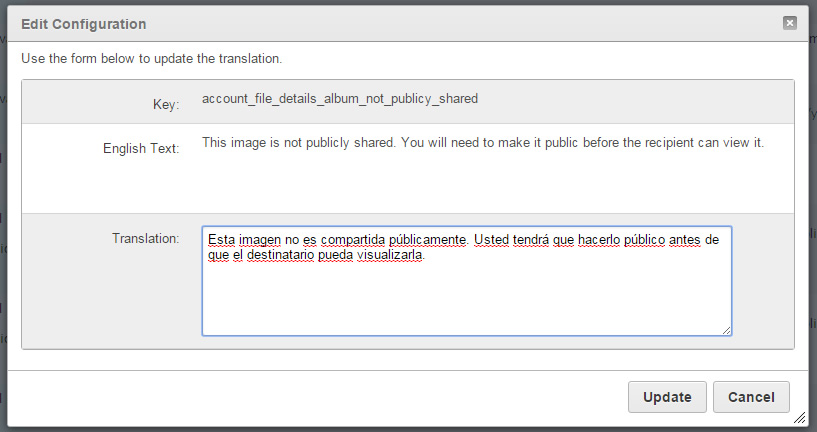
- Once you've found it, click 'edit'.
- Click 'update' once you're done. The translation will be immediately available on your site.
Directory Structure
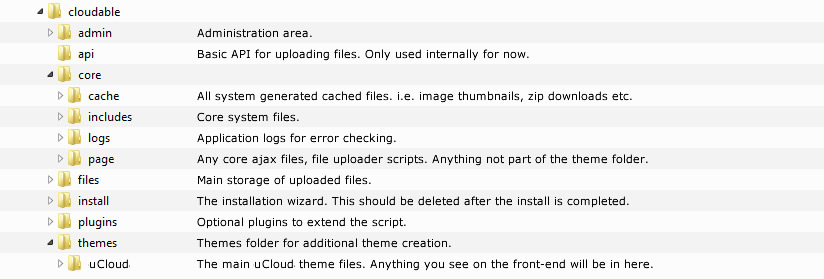
The script structure can be seen below with notes next to each folder detailing it's purpose.
Creating A New Theme
You can create your own themes within uCloud so future updates to the theme part of the script don't overwrite any custom changes.
1) Create a new directory named your theme in /themes/. Lowercase alphanumeric and underscores only. i.e.
/themes/yourtheme/
2) Copy the contents of /themes/flow/ into /themes/yourtheme/
3) In /themes/yourtheme/_theme_config.inc.php replace the parameters:
$themeConfig['theme_name'] = 'uCloud Theme'; // the name of the theme
$themeConfig['folder_name'] = 'cloudable'; // the folder name you just created
$themeConfig['theme_description'] = 'uCloud Main Theme'; // theme description shown in the admin area
$themeConfig['author_name'] = 'uCloud'; // your name
4) Rename /themes/yourtheme/themeuCloud.class.php to /themes/yourtheme/themeNewtheme.class.php, ensuring you make the first letter of the theme name uppercase and the rest lowercase.
5) Open /themes/yourtheme/themeNewtheme.class.php and change line 3 from:
class themeuCloud extends Theme
to
class themeNewtheme extends Theme
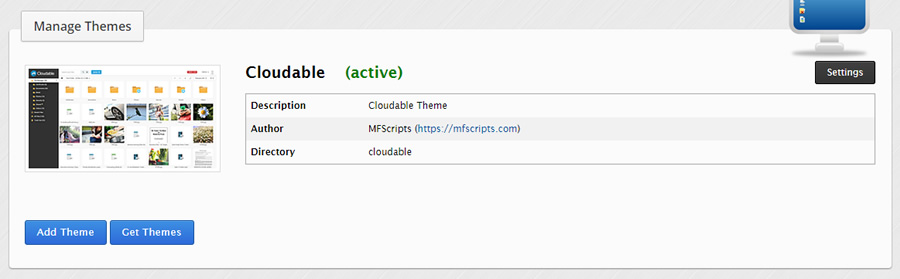
6) You should now be able to enable the theme via your script admin area. The admin area thumbnail can be found in:
/themes/yourtheme/thumb_preview.png
Adv Performance Tuning
Your server configuration can have a significant impact on the performance of uCloud. Below are some of the server settings we'd recommend using. It assumes you have at least a VPS server with root access and understand what you're doing!
Apache
- Enable XSendFile to take load away from PHP - https://support.mfscripts.com/public/kb_view/1/
Nginx (recommended over Apache)
- Enable X-Accel-Redirect to take load away from PHP - https://support.mfscripts.com/public/kb_view/2/
- Amend /etc/nginx/nginx.conf
http {
    #...
    fastcgi_read_timeout 300;
    #...
}
Restart Nginx after any changes.
PHP
- Amend the following values in your global php.ini file:
memory_limit = 512M
upload_max_filesize = 500M
post_max_size = 500M
max_execution_time = 180
max_input_time = 180
Restart your webserver to apply the changes.
PHP-FPM (if using Nginx)
- Amend /etc/php5/fpm/pool.d/www.conf
request_terminate_timeout = 300
pm.max_children = 50
Source for max_children - http://myshell.co.uk/blog/2012/07/adjusting-child-processes-for-php-fpm-nginx/
PHP Fast CGI
- If you're using FastCGI with PHP/Apache ensure you allow for any timeouts on large downloads, by default they will close connections after 5 minutes so you may get partially completed downloads. In your Apache config file add the following:
<IfModule mod_fcgid.c>
FcgidBusyTimeout 43200
</IfModule>
If you're using WHM/cPanel you can add this to /usr/local/apache/conf/includes/post_virtualhost_global.conf
Save and restart Apache.
MySQL
1) Enable query cache.
Edit my.cnf file (sometimes in /etc/mysql/my.cnf)
nano /etc/mysql/my.cnf
Add or uncomment the following lines:
query_cache_size = 268435456
query_cache_type = 1
query_cache_limit = 1048576
Restart MySQL. (this command will be different depending on your OS)
service mysql restart
2) Increase max connections in MySQL. In your my.cnf file, add or amend the following:
max_connections = 600
Save and restart MySQL. You may need to adjust this value depending on your traffic levels and server resources available.
Other
- Use CloudFlare to reduce load, speed up website content to your users and protect against DOS attacks.
Useful Links
- MySQL How & When to Enable Slow Query Logs: http://www.pontikis.net/blog/how-and-when-to-enabl...
- PHP Best Practice: http://www.cyberciti.biz/tips/php-security-best-pr...
- Install PHP SuHosin: http://www.cyberciti.biz/faq/centos-rhel-6-install...
TroubleShooting
Website pages and download links not working after install (404 errors)
Problem
After installing the script none of the html links are working and neither are the generated file download urls.
Fix (Apache)
This is generally one of the following issues:
- ModRewrite hasn't been enabled within Apache. Contact your host to have it enabled.
- You haven't uploaded the .htaccess included in the root of the script download. Sometimes certain operating systems don't show files starting with a dot. Ensure it's appearing in the root of your installation. Anti Virus software has also been known to hide the .htaccess so ensure this is temporarily disabled.
- You've installed the script in a sub-folder. If this is the case you'll need to amend the .htaccess file to include your sub-folder path. In .htaccess find:
RewriteBase /
Replace with:
RewriteBase /yoursubfolder/
- If the .htaccess file has been uploaded, Apache may be set to ignore these files. In your Apache config file (sometimes called apache2.conf) set "AllowOverride All" similar to this:
<Directory /var/www/>
	AllowOverride All
</Directory>
Fix (Nginx)
This is generally one of the following issues:
- The Nginx rewrite rules haven't been added to your Nginx site config file. See the "___NGINX_RULES.txt" file in the root of the script download for the correct Nginx rules.
- The path within your Nginx rules is incorrect. Ensure the root path points at your site root. Example:
root /usr/share/nginx/html;
- You have not restarted Nginx after making the above changes. Restart via SSH. Example: (this will change depending on your Linux distro)
sudo service nginx restart
How to reset the admin password if you've forgotten it
Problem
You've forgotten the admin password to your installation
Fix
1) Try the forgot password form on yoursite.com/forgot_password.html
2) If you can't remember the email address or it's invalid, you can reset it directly via the database.
- Login via your MySQL client such as phpMyAdmin.
- Execute the following sql on your database, replace ADMIN_USER with your admin username (usually 'admin') and NEW_PASSWORD with your new password.
UPDATE users SET password = MD5('NEW_PASSWORD') WHERE username='ADMIN_USER';
For example:
UPDATE users SET password = MD5('myp455w0rd') WHERE username='admin';
Emails are not being sent when a user registers on the site or when the contact form is submitted
Problem
When a user registers on the site they see the confirmation screen however they never receive an email with their password in it.
Fix
This is due to a number of reasons, try each of the following in order:
1) Test a registration yourself and ensure the email isn't being sent to a spam folder. If it is being spammed or if AOL/Hotmail accounts are not receiving emails, ensure you have SPF records setup for your domain. Your host or system admin can enable this.
2) There are 2 methods the script uses to send email, PHP and SMTP. The default is PHP. Sometimes web hosts block PHP from sending to stop spam scripts from running so although PHP attempts to send the email, it doesn't actually go anywhere. If this is the case switch to SMTP sending via the admin area, site settings. (below)
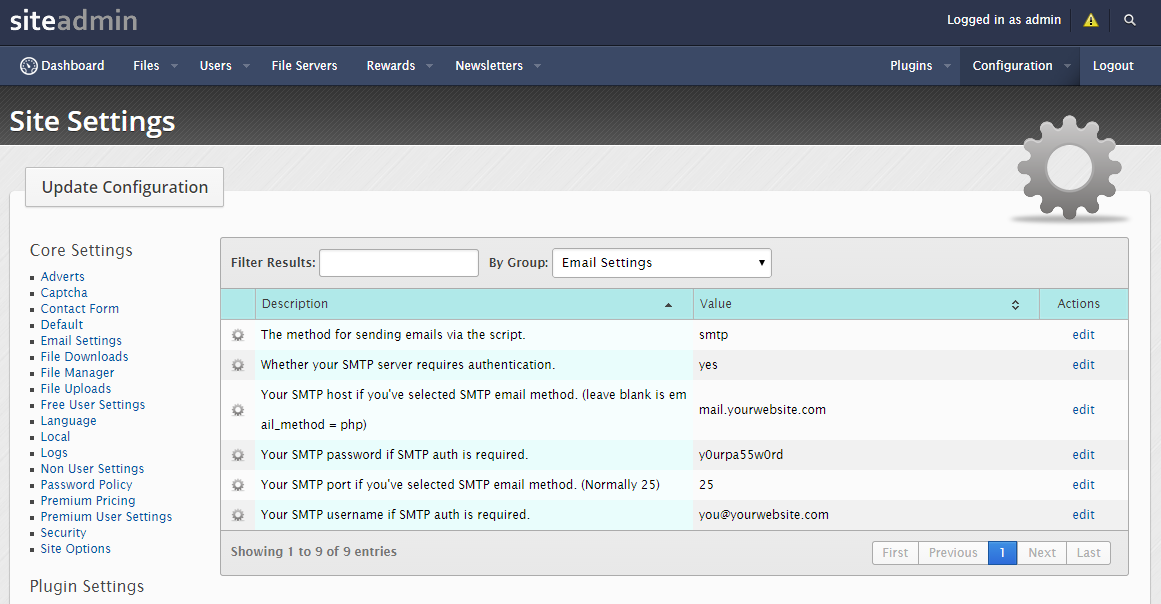
Set the options as shown above but replace with your own SMTP email settings. Your web host will be able to confirm these.
3) If the above doesn't work you can test SMTP sending for any errors. To test:
- Via FTP edit /admin/_test_scripts/test_email.php and replace the email address (you@youremail.com) with your own.
- Re-upload the file to your website.
- Login to your /admin/ area.
- Then in the browser load this url maually - http://yoursite.com/admin/_test_scripts/test_email...
- An email will be attempted to the email address you entered. Any errors will be shown on screen. A common error is that the sending email address can not be used via that SMTP server so you may need to change the sending email address or ask your web host to allow it.
Note: Sometimes not all debug messages are captured and outputted in the test_email.php script above. You can increase the debug level by temporarily editing the code. In coreFunctions.class.php find $mail->SMTPDebug = 1; and replace with $mail->SMTPDebug = 2; Save, reupload and test again for more detailed information.
Changelog
Version 1.2 (18/03/2016)
- PHP7 support.
- Login with your Facebook, Twitter or Google+ Account (optional setting via admin).
- User registration page and relating admin settings:
--- Whether to enable or disable the registration form.
--- Whether to display the captcha on the site registration form.
--- Block email address domains from registering. Comma separated list of domains.
--- Block usernames from the registration page.
- Automatic language translations via Google Translate API. Translate the entire site content to another language by clicking a button. Note: Requires a Google API key. Menually edited translations can be marked as 'locked' so they're not overwritten.
- Added support for username and password protected http & ftp urls. In the format ftp://user:pass@host.com/filename.txt.
- Improved session handling and how regularly the sessions are cleared from the database.
- Reduced the amount of data stored in each session for bettter performance, from (up to) 65k to just over 1k.
- Updated IP to Country data and added admin script to update the data as needed. (see the top of /core/includes/ip2Country.class.php)
- Improved right 'next page' arrow positioning when viewing files. Allows for easier scrolling of documents.
- Allowed for files to be dragged into folder icons on the main view.
- Added menu down arrow on folder icons.
- Admin Area:
--- Added option in admin to block the same file from being re-uploaded. Optional on file remove and automatic after removal on abuse reports.
--- Added admin "impersonate user" option, so admin users can login as any other user account.
--- Added new admin page for backing up the database and codebase. Functionality also built in preparation for automatic upgrades at a later date.
--- Admin option to set blocked keywords within the filename on file uploads.
--- Added option to temporarily disable file uploads globally via the admin area, site settings. Uploads will still function for admin accounts.
--- Added option to temporarily disable file downloads globally via the admin area, site settings. Downloads will still function for admin accounts.
- Fixed issue with file move between external file servers.
- Various other UI fixes and improvements.

NOTE: There are database changes in this release. See \install\resources\upgrade_sql_statements\v1.1 - v1.2.sql
Version 1.1 (01/21/2016)
- Added watermarking of images by folder option. Upload a png watermark, set the position and padding. This can then be enabled by folder. Use this to share 'proof' copies of images to customers without giving the user full access to the image.
- Added an option to hide or show the download button when sharing folders.
- Automatic language translations via Google Translate API. Translate the entire site content to another language by clicking a button. Note: Requires a Google API key.
- Added admin, theme settings option to add custom CSS code. This is kept between upgrades of the code.
- Added admin, theme settings option to set the logo on the publicly shared pages.
- Support for previewing animated gifs.
- Added 'download all images' as zip file option when folder is shared.
- Fix to hide OG image if file is set as private or requires a password.
- Reduced the maximum size of portrait images when previewing, better fit for common screen resolutions.
- Improved UI layout on mobile preview of images.
- Other minor updates and improvements.

NOTE: There is database changes in this release. See /install/resources/upgrade_sql_statements/v1.0 - v1.1.sql
Version 1.0 (01/07/2016)
- Initial release.
License & Credits
License
This program was developed by MFScripts Ltd and is copyrighted.
THIS SOFTWARE AND THE ACCOMPANYING FILES ARE PROVIDED "AS IS" AND WITHOUT WARRANTIES OF ANY KIND WHETHER EXPRESSED OR IMPLIED.
In no event shall the author or MFScripts Ltd be held liable for any damages whatsoever, including without limitation, damages for loss of business profits, business interruption, loss of business information, or any other loss arising from the use or inability to use the software.
Your purchase of uCloud allows you to install a SINGLE (one) copy of uCloud on ONE server. You may not resell, distribute or rent uCloud.
Credits
MFScripts Ltd
- Adam Wilson - Lead Developer
- Simon Nooranvary - Responsiveness & Application Testing
3rd Party Code
A number of MIT, LGPL and other copyrighted libraries and resources have been used in this program. These copyrights remain the property of their owners.
Some of these libraries include:
- PHPMailer
- jQuery
- Bootstrap
If we have missed anything please let us know!
Wrap Up
We've spent the past 4 months building uCloud, plus years building and tuning the core framework however there's still lots more we can do. If you have any comments on how we can improve the script further feel free to post on our RFCs via the MFScripts forum or on CodeCanyon.
Thanks again for your continued support!
C O D E L I S T .C C